

A story needs more than a pleasant voice: it needs a narrator the listener can follow, dialogue that is easy to distinguish, and pauses that leave room for the scene. Voice AI offers a starting point for narration with delivery controls, while more specialized Canva apps focus on children’s stories, multi-speaker dialogue, emotional delivery or soothing bedtime narratives.
This selection is published by the Voice AI team and is based on Canva app listings checked on 4 November 2026. “Best” means a useful fit for a storytelling task here; we have not run an independent listening test across these apps.
Choose the storytelling job before the voice
First decide what the voice must do. An illustrated bedtime story may need a calm continuous narrator. A short character scene may need clearly separated speakers. A suspenseful explainer may need only a change of pace, not a different voice for every sentence.
- Narrator with adjustable delivery: start by evaluating Voice AI.
- Children's storybooks and learning narration: inspect Children Voiceover.
- Scenes with more than one speaker: inspect Voice Maker's dialogue workflow.
- Emotion-led narration: evaluate Emote AI Voice's controls.
- AI-assisted soothing stories: inspect AI Voice Story.
- Regional English character or narrator accents: evaluate Voiceover Accents.
These are different reasons to shortlist an app. Do not treat a large voice catalogue, a story-writing feature and a multi-speaker workflow as interchangeable capabilities.
Canva-displayed users for the storytelling shortlist
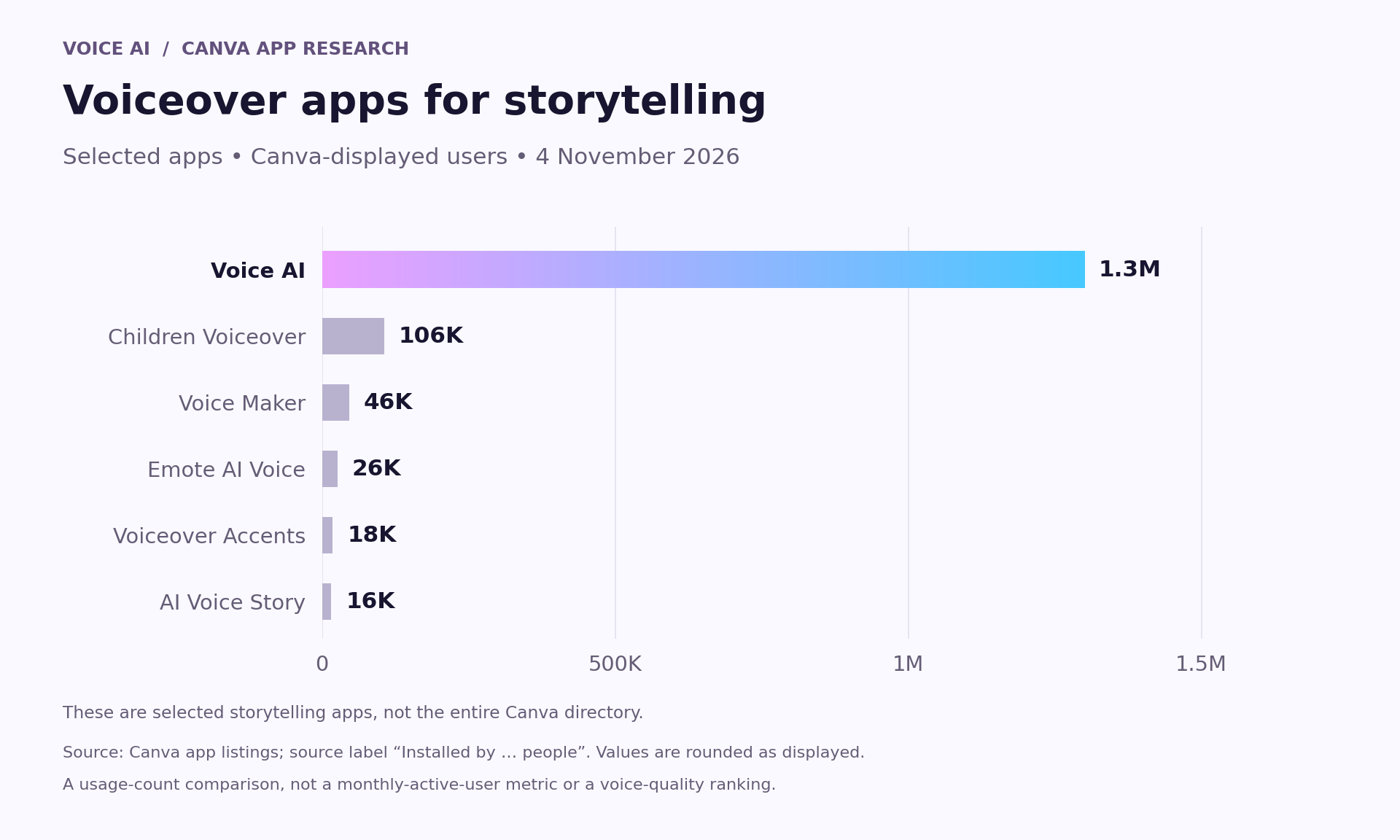
- Voice AI: 1.3M users.
- Children Voiceover: 106K users.
- Voice Maker: 46K users.
- Emote AI Voice: 26K users.
- Voiceover Accents: 18K users.
- AI Voice Story: 16K users.
The figures above are Canva's rounded directory counts checked on 4 November 2026. The source label is “Installed by … people”. They describe usage, not monthly activity, listener ratings or storytelling quality. The shortlist is limited to the apps discussed here.
Voice AI has the largest displayed count within this particular storytelling selection. Smaller specialist apps can still be relevant when their stated workflow matches your project. Choose a suitable voice with a real scene rather than relying only on the usage count.
Six different approaches to narration
Voice AI: shape the delivery of an existing script
Voice AI, by imagination-soft, lists more than 1,800 voices and adjustable speed and emotion. It is a practical starting point when you already have a story and want to tune how its narrator delivers it.
Try the opening, a line of dialogue and a quiet ending with the same selected voice. Check which controls that voice offers. An expressive setting should support the scene without making ordinary connective sentences sound overstated.

Official Voice AI product illustration. It shows an earlier interface; current labels and available controls may differ.
Children Voiceover: storybooks and learning material
Children Voiceover, by Coral Solutions, is positioned around children's storybooks, bedtime content and learning narration. It is worth inspecting when the intended audience and reading style are more specific than general video narration.
The name and positioning do not establish suitability for every child or age group. Review the script, pronunciation and pacing yourself, and listen to the entire scene before using it in educational or bedtime material.
Voice Maker: investigate multi-speaker scenes
Voice Maker, by RapideAI, advertises expressive speech in more than 70 languages and multi-speaker dialogues for presentations, audiobooks and related content. That makes it a relevant candidate for a conversation between two characters.
Test how the app represents speaker changes and whether the result is easy to edit in your design. Do not infer automatic character casting or speaker consistency across an entire book from the listing alone.
Emote AI Voice: put emotion in context
Emote AI Voice describes adjustable emotion for narration, including text in videos, podcasts and presentations. Consider it when the scene relies on a shift such as curiosity becoming relief.
Compare a restrained delivery with a more expressive one using exactly the same sentence. More emotion is not always clearer storytelling: a subtle line can work better when the illustration or music already communicates the mood.
AI Voice Story: soothing, AI-assisted narratives
AI Voice Story, by ZestGPT, focuses on generating soothing stories with AI assistance for relaxation, sleep and bedtime. It suits a different starting point from a tool that only reads a fully written script.
Review generated story content for consistency and appropriateness before narrating or presenting it. A relaxation theme is not evidence of a medical benefit or a guarantee that an audience will fall asleep.
Voiceover Accents: regional English delivery
Voiceover Accents, by Autopilot, focuses on English voiceovers with regional accents and mentions narration and storytelling. It may be useful when an accent is a meaningful part of the narrator's setting or the intended audience.
Check the particular accent in the app and use a listener familiar with it when accuracy matters. Avoid using accent alone as a shortcut for a character's personality or background.
Use one short scene to compare the voices
The following original passage includes narration, dialogue and a pause-worthy reveal. It is a test script, not a transcript of an audio sample we have generated.
“The lighthouse was dark when Mira reached the door. She knocked twice. From inside, a small voice answered, ‘I thought you had forgotten.’ Mira held up the lantern. ‘Not tonight,’ she said. Beyond the window, the first boat appeared through the mist.”
- Opening: is the location clear before the action begins?
- Dialogue: can a listener tell who is speaking without staring at captions?
- Pause: does the gap before the answer create interest without feeling broken?
- Ending: does the delivery leave room for the boat's visual reveal?
- Continuity: does the narrator still sound like the same person after a revised line?
For an audio-only narrator, make the speaker clear through writing. For a multi-speaker test, assign the same lines consistently and compare the clarity of each transition. Judge the rendered scene with its illustrations as well as through headphones.
Turn the chosen narration into a Canva scene
Divide the scene into meaningful beats before generating a long passage. In Voice AI inside Canva, paste a short segment, select a voice, review the delivery settings and create the narration. Add the chosen audio to the design, then give each illustration enough time to support the words.
Keep music and sound effects below the narrator when words are important. Listen again after a dramatic transition: the loudest moment should not obscure a character's line. If the story will be translated, review a separate script in each language instead of assuming a multilingual voice tool will translate the scene for you.
Frequently asked questions
Which app should I try for a single narrator?
Voice AI is a starting point when you want to use an existing script and adjust delivery. Evaluate a representative scene, including dialogue and quiet lines, before committing the full story.
Which shortlisted app advertises multi-speaker dialogue?
Voice Maker explicitly mentions multi-speaker dialogues in its Canva listing. Check its current speaker-assignment and editing workflow with a short scene before planning a long project around it.
Does an emotional voice automatically make a story better?
No. Emotion needs to match the writing and visuals. Compare a restrained take with an expressive one and choose the version that makes the scene easier to understand.
Does Children Voiceover mean every voice is a child's voice?
That cannot be established from the listing's storybook positioning alone. Inspect the available voices and listen to the actual sample before making a casting decision.
Can these tools automatically translate my story?
This comparison does not establish automatic translation. Prepare a reviewed target-language script, then check the appropriate language and voice in the selected app.