

The best AI voiceover app in Canva depends on what you need to make. Start with Voice AI for script-to-narration with delivery controls, Voice Studio when script preparation matters, or AI Voice Hub when you also need transcription or sound effects. If your output needs a talking presenter, AI Speaker belongs in a separate avatar-video shortlist.
This guide compares six selected Canva apps by their published capabilities and directory usage counts, checked on 4 November 2026. It is published by the Voice AI team; Voice AI and AI Speaker are both by imagination-soft. The recommendations are workflow matches, not results from an independent audio-quality benchmark.
Quick picks for different jobs
- Voice AI: a starting point for written narration with adjustable speaking speed and emotion.
- Voice Studio: worth checking when you want help preparing scripts or starting from caption files.
- AI Voice Hub: relevant when your project also needs speech-to-text or sound effects.
- AiVOOV - Voiceover: a candidate for projects that need a broad language catalogue.
- AI Text to Speech: a straightforward type, choose and generate workflow from Audeus.
- AI Speaker: an option for a visible talking avatar, rather than an audio-only narration track.
Choose your output first. A voice clip can accompany slides, footage or animation; an avatar clip adds a visible presenter and must also fit your visual layout. A larger list of advertised voices does not tell you whether the specific voice, language or tone you need is available in your account.
Canva-displayed users: the selected apps
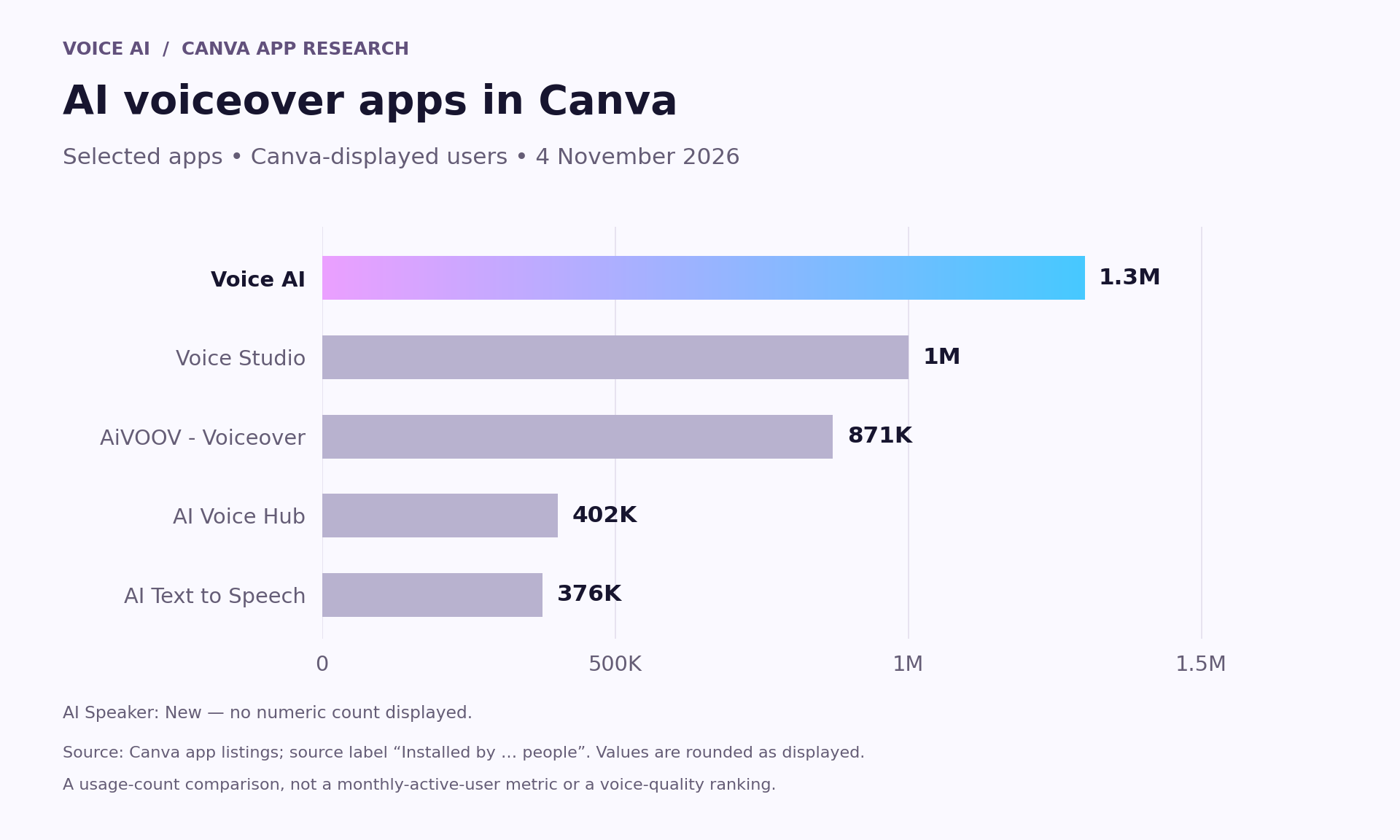
- Voice AI: 1.3M users.
- Voice Studio: 1M users.
- AiVOOV - Voiceover: 871K users.
- AI Voice Hub: 402K users.
- AI Text to Speech: 376K users.
- AI Speaker: New; no numeric count displayed.
These are the rounded usage counts shown by Canva on 4 November 2026. Canva labels the measure “Installed by … people”; it is not a monthly-active-user or paying-customer measure. AI Speaker displayed “New”, so no numeric count is available. This is a selected shortlist, not a ranking of every voice app in Canva.
Usage can show how widely an app has been adopted. It cannot establish pronunciation, expressive range or suitability for your script. Use these figures alongside the workflow differences below, not as a substitute for listening.
What each app brings to the workflow
Voice AI: control the delivery of your script
Voice AI is made by imagination-soft. Its Canva listing advertises more than 1,800 voices and adjustable speed and emotion. That makes it a practical starting point when you already have a script and want to compare how a line sounds at different delivery settings.
Try a short section with your brand name, a sentence ending and one important number before generating the full narration. Look at the controls offered by the voice you select; do not assume every voice exposes the same settings. The useful test is whether the words remain understandable at your intended pace.

Official Voice AI product illustration. It shows an earlier interface; current labels and available controls may differ.
Voice Studio: prepare the script as well as the audio
Voice Studio, by Qutesoft, lists support for more than 150 languages. Its described inputs include typed or pasted scripts, caption files and selected text. The listing also mentions AI script refinement and generation.
This is a different starting point from simply choosing a voice. If the material is still scattered across captions or rough notes, assess the script-preparation workflow first. Review any rewritten text for meaning and factual accuracy before using it as narration. The listing mentions free credits but does not establish a universal allowance or a permanent free plan.
AI Voice Hub: combine voice with other audio tasks
AI Voice Hub lists text-to-speech, speech-to-text and sound effects, alongside more than 1,900 voices and over 30 languages. It is worth investigating when a production needs more than a narrator—for example, transcribing an existing recording and preparing sound effects for the edit.
Treat those as separate tasks to check in the app. Listing several tools does not prove that it automatically turns a transcript into a finished, synchronized video.
AiVOOV - Voiceover: check the required language first
AiVOOV advertises more than 1,000 voices and support for over 150 languages. Its broad catalogue makes it a candidate for a multilingual shortlist.
Prepare one representative paragraph in the actual target language. Confirm that the required accent and voice are present, and have a fluent reviewer listen to the output. The number of advertised languages is not evidence of automatic translation or equally strong delivery in every language.
AI Text to Speech: a direct narration workflow
AI Text to Speech, by Audeus, describes a simple sequence: type text, choose a voice and generate audio. Its listing also mentions multiple languages.
This is a reasonable option to inspect if you want a direct text-to-audio flow without making script generation or avatar production part of the decision. Verify the available voice, controls and usage allowance in the app before committing a long script.
AI Speaker: when the presenter needs to be visible
AI Speaker, also by imagination-soft, creates talking avatar videos from scripts. Its listing describes hundreds of voices, multiple avatars and custom video backgrounds, with the resulting talking clip added to a Canva design.
Choose this category when the on-screen presenter is part of the message. Compare framing, background and the clip's fit with the design as well as the voice. It is not an interchangeable replacement for a standalone narration track.
Run a useful comparison with one short script
Use the same words in each app so that a change in writing does not get mistaken for a change in voice quality. Here is an original test script:
“Welcome to the project update. Our next workshop starts on Friday at nine thirty. We will review the first draft, choose two improvements, and agree on one clear next step.”
- Listen for clear pronunciation of names, numbers and short connecting words.
- Check whether the pause between ideas gives viewers time to follow the visuals.
- Try the available pace or emotion controls without changing the script at the same time.
- Check the app's current credits, price, usage terms and supported output before a larger project.
- Add a sample to your Canva design and judge it in context, not only in isolation.
We have not run a blinded listening test across these apps. This repeatable check is a method for making your own decision, not a claim that one app has already won it.
A practical first pass in Voice AI
Open Voice AI inside Canva, paste one short segment, choose a voice and review the available delivery settings. Preview or generate a sample, adjust only what needs changing, and add the chosen audio to the design. Then align the visuals to the actual spoken duration.
For a longer project, keep one segment per scene or idea. That makes it easier to replace an awkward line without rebuilding the entire narration. Finish by playing the complete Canva edit, including transitions and background audio.
Frequently asked questions
Does the app with the most users have the best voice?
No. Canva's displayed count describes adoption, not an audio-quality score. The best choice for a particular project depends on the voice, script, language and workflow you test.
Are Voice AI and Voice Studio the same app?
No. Voice AI is by imagination-soft; Voice Studio is by Qutesoft. They are separate Canva listings with different described workflows. Check both the app name and developer when searching.
Should I choose AI Speaker for ordinary voiceover?
Choose it when you need a talking avatar video. If the design only needs an audio track behind slides or footage, start by evaluating an audio-focused voiceover app.
Can I assume the advertised languages include translation?
No. A language catalogue describes voice options, not necessarily translation. Prepare and review the target-language script, then check the matching voice.
Can I use every app for free?
The listings do not establish one shared free allowance. Check the current in-app credits, pricing and usage terms for your selected tool and project.